Access Request Form Shortcutaub.ie/aar
KB Article Shortcutaub.ie/aarkb
What is the Access Request Solution?
This guide saves time by explaining who can request or approve access, how delegated approvers/submitters work, and where to submit and track requests. It clarifies required Auburn credentials, role-based permissions, and the tailored forms for IDs, logins, library, parking, GTA, TES, and affiliates. It also shows the My Requests widget and status codes so you can quickly see and act on pending items.
Tip: Needed to Complete an Access Request Form:
-
Auburn University Credentials (email and password)
-
Role for Permissions
- Super Approver Role are given access by default
- Super Approvers are comprised of DDDHs - Deans, Directors, and Department Heads
- These are provided via integration with Banner and are updated each night automatically.
- Approver Role (delegated by a Super Approver)
- Submitter Role (delegated by a Super Approver or an Approver)
- Super Approver Role are given access by default
1. Navigate to https://aub.ie/aar
NOTE: This site can also be accessed by clicking the "Access Request Form" button on the AU Affiliate web site (https://aub.ie/affiliate)
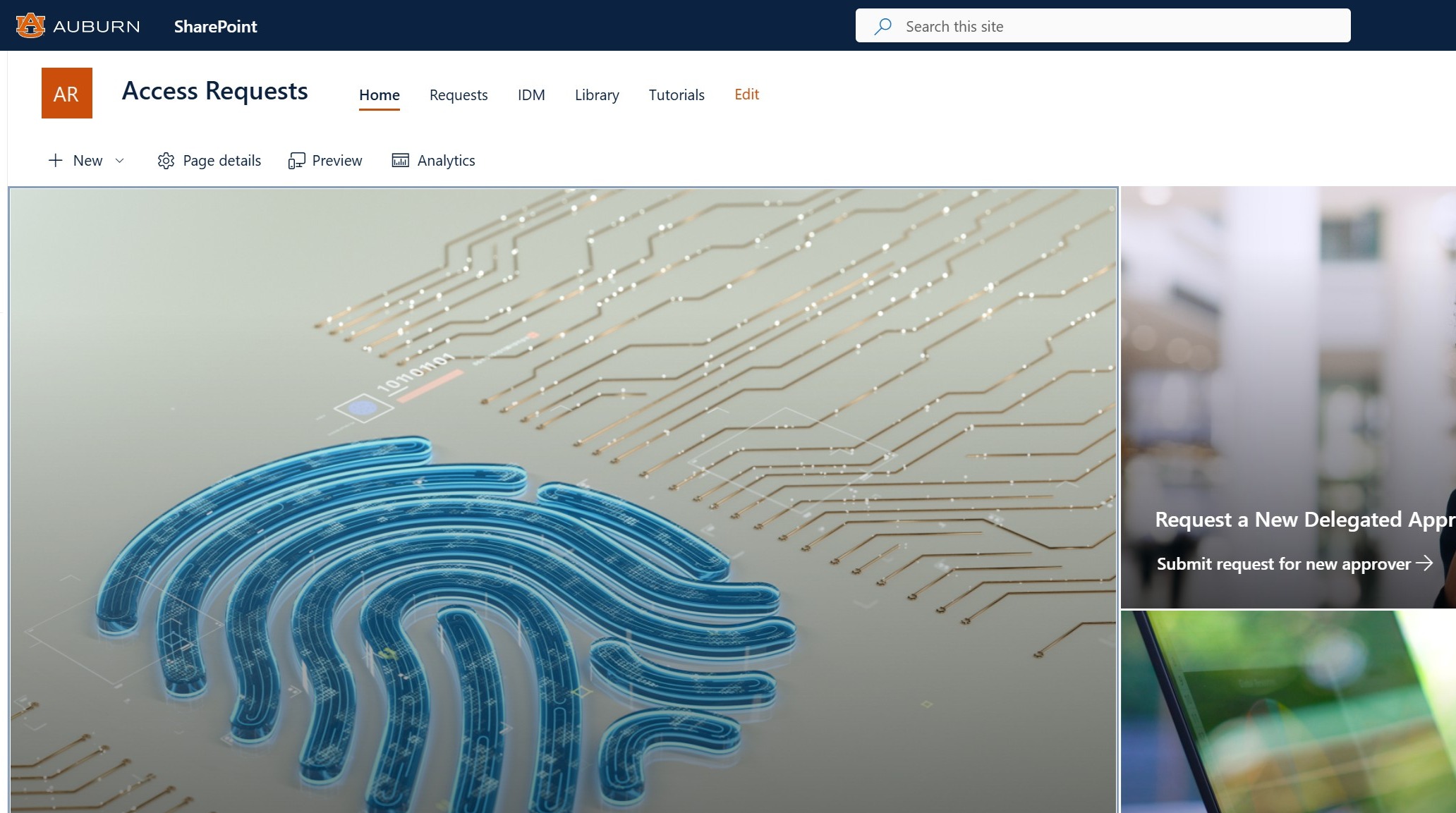
2. Access Request Submission
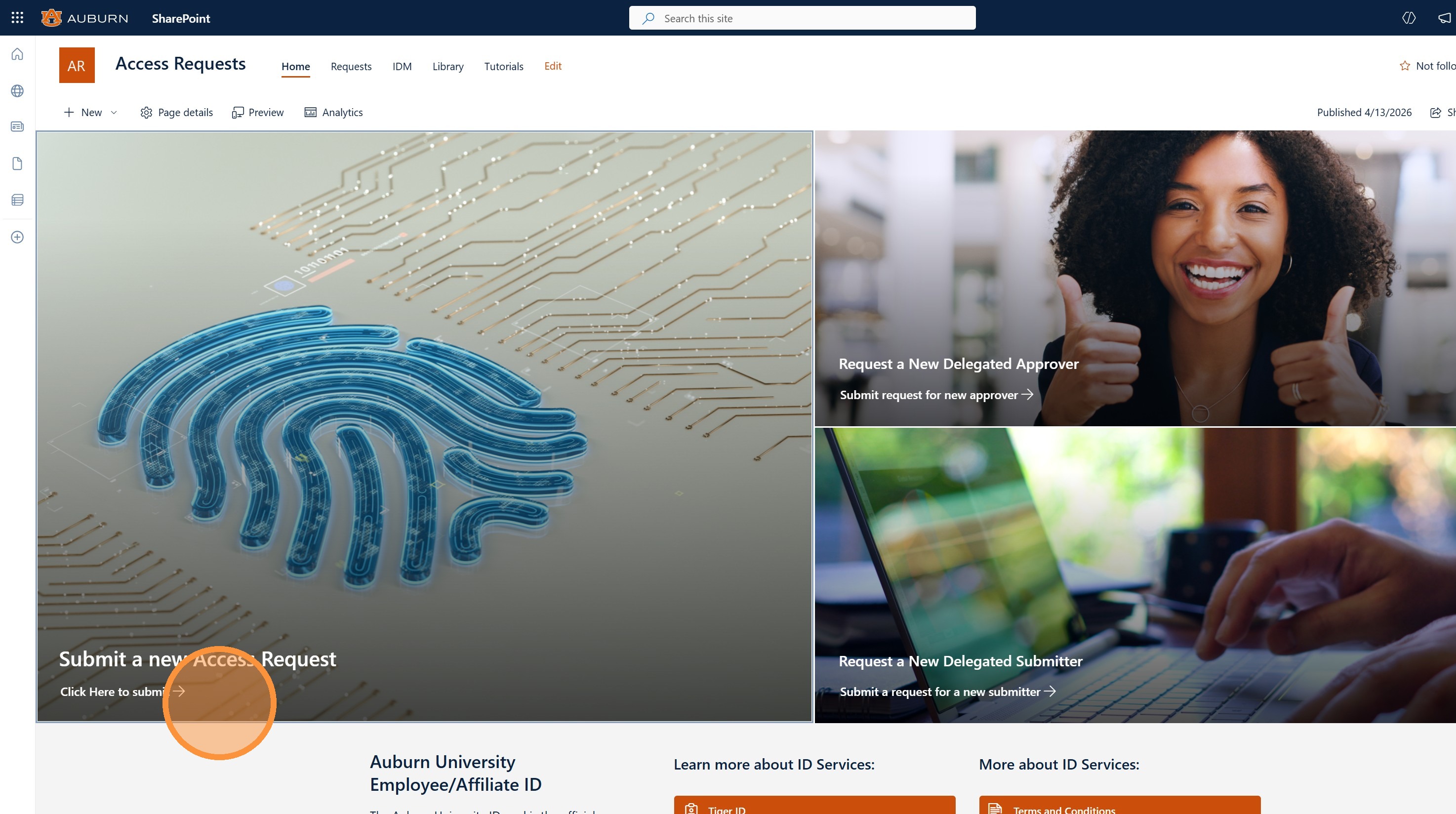
Use the access request form to request Auburn University IDs, Login Credentials, Library Access, or Parking for Graduate Teaching Assistants (GTA), Temporary Employee Services (TES), or Affiliates. (Areas of Access may vary by user request type)
To submit an Access Request form; Click the Submit a New Access Request image
3. Example: Access Request Form
After you select the User Type you will be provide a form tailored to the User Type you selected.
User Types Processes
-
AU Graduate Student
- Graduate School is notified and request is closed
-
AU TES
- Areas of Access options
- Library
- Parking
- Each area requires Departmental Approval and Area Task Completion except parking.
- If parking is selected, they are sent an email after all other areas have completed their tasks.
- Areas of Access options
-
AU Affiliate
-
Areas of Access options
- Identity Management (IDM)
- Library
- Parking
-
Each area requires Departmental Approval and Area Task Completion except parking.
-
If parking is selected, they are sent an email after all other areas have completed their tasks.
-
Note: if the affiliate is foreign and does not have an AU ID they will need to use a different process.
-
You will be presented with these instructions:
All FOREIGN NATIONAL AFFILIATE IDM ACCESS REQUESTS must be approved and/or referred to the Identity Management Office, via email, by the Office of International Programs or the Office of the Vice President for Research office.If this Foreign National Affiliate is sponsored by Auburn University, -- Please contact:
- The Office of International Programs
228 Foy Hall
Phone: (334) 844-5001
If this foreign national Affiliate is sponsored by someone other than Auburn University -- Please contact:
- The Office of the Vice President for Research
University Research Security Officer
1418 Wiggins Hall
Phone: (334) 844-5962
- The Office of International Programs
-
-
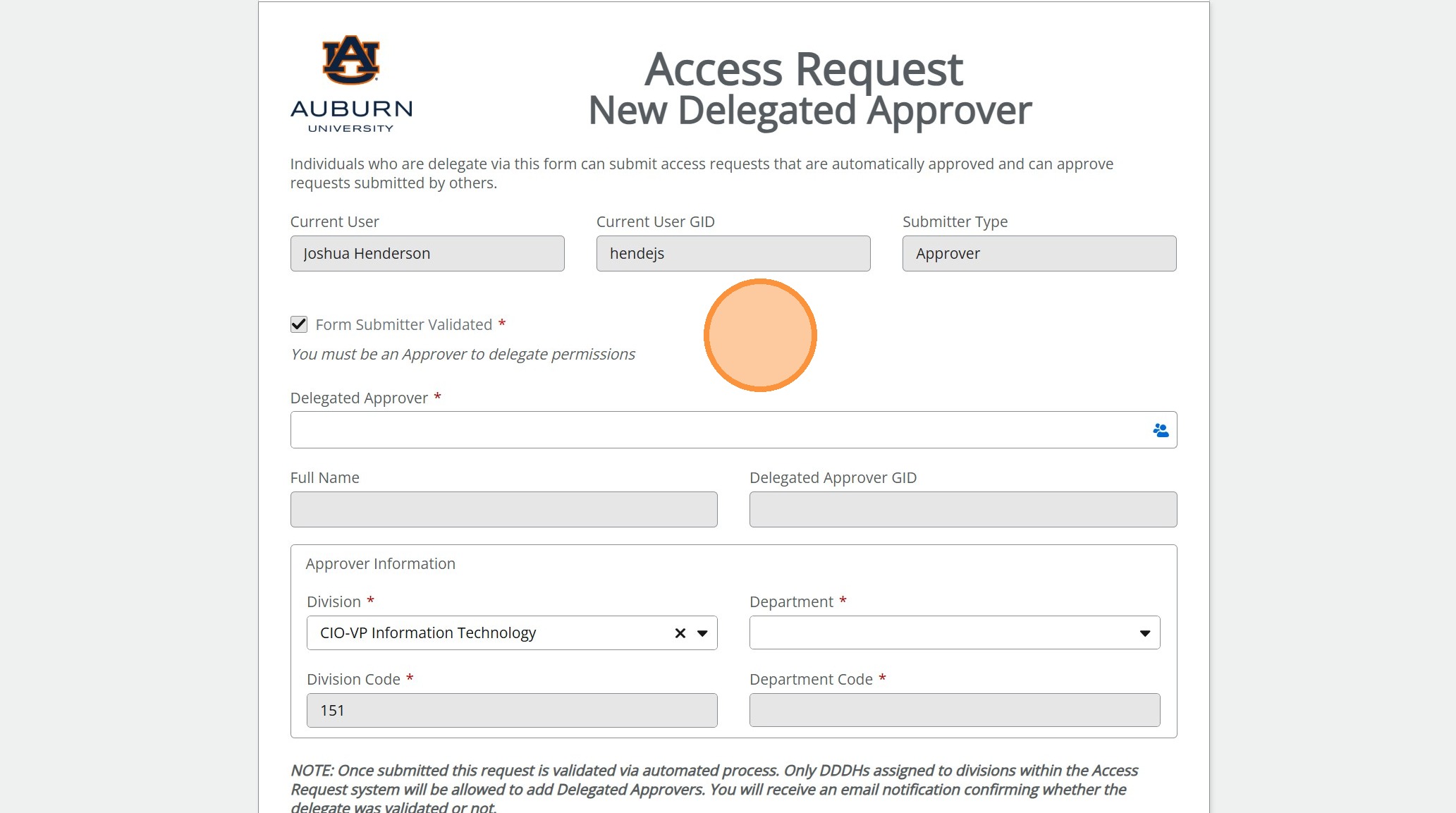
4. Request a Delegated Approver
Delegated Approvers can be requested by a Super Approver. Once completed the delegated approver will have the ability to approve and submit on behalf of the Super Approver who requested the delegation. Delegated permissions are updated each morning at 3:00 AM. We are working to make this a quicker update. If/When this changes to more "real-time" we will update this article to reflect the change.
To delegate an approver; Click the Request a New Delegated Approver image

5. Example: Delegate Approver Form
6. Request a Delegated Submitter
Super Approvers and Approvers have the ability to request a delegated submitter. Once completed the delegated submitter will be able to submit, but NOT approve, on behalf of the Super Approver or Approver that delegated their submission permissions. Delegated permissions are updated each morning at 3:00 AM. We are working to make this a quicker update. If/When this changes to more "real-time" we will update this article to reflect the change.
To delegate a submitter; Click the Request a New Delegated Submitter image
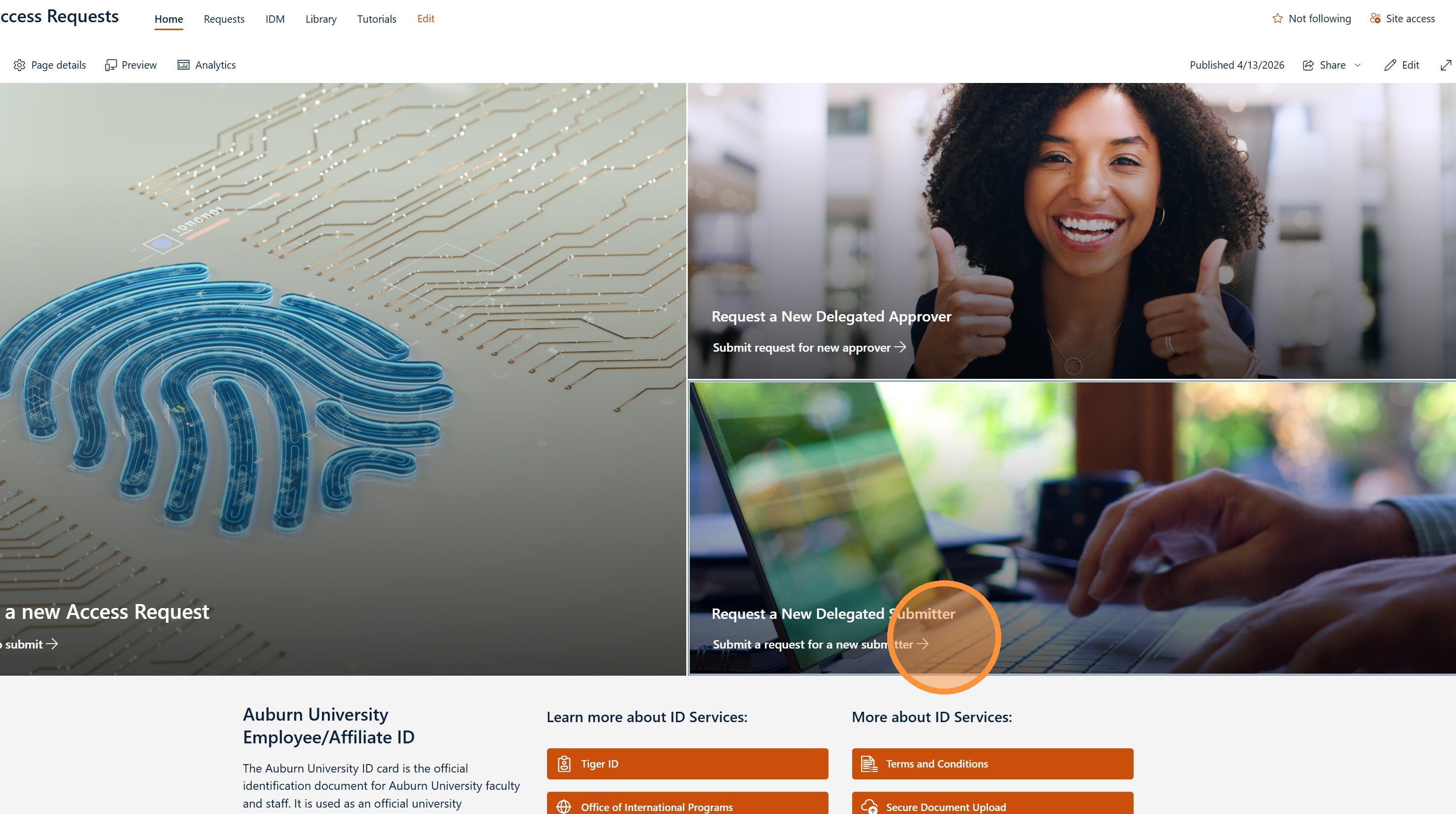
7. Example: Delegate Submitter Form
8. My Requests
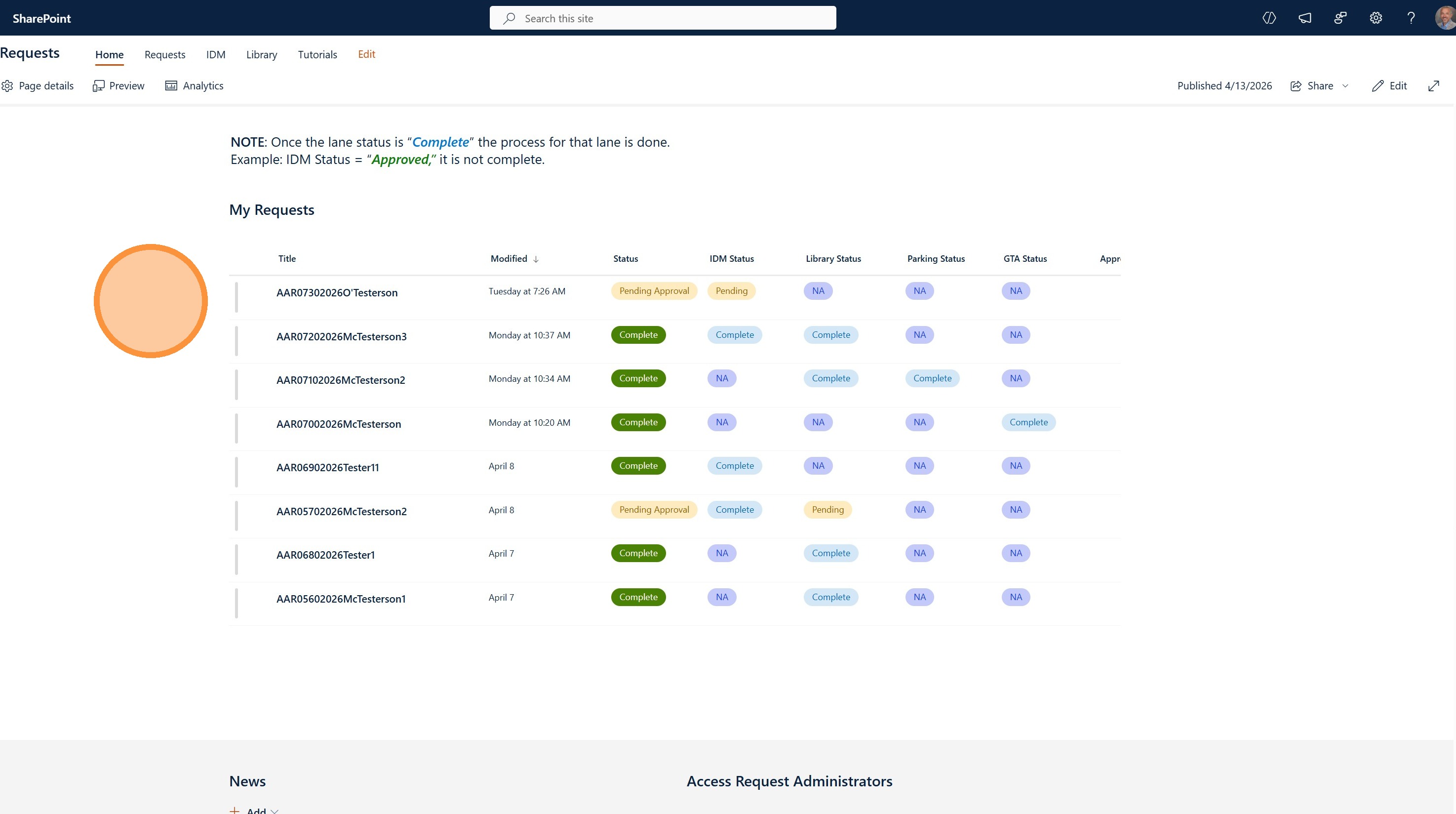
To limit where you have to navigate to view status and take action we have provided My Requests widget with color coded statuses and links to forms for any actions you need to take.
- Status: Submitted / Pending Approval / Complete
- Overall request status
- IDM Status: NA / Not Started / Pending / Approved/ Denied / Complete
- Library Status: NA / Not Started / Pending / Approved/ Denied / Complete
- Parking Status: NA / Not Started / Pending / Approved/ Denied / Complete
- GTA Status: NA / Not Started / Pending / Approved/ Denied / Complete
Section Status Codes
- NA = Not Applicable
- Not Started = Automated workflow has not started
- Pending = Awaiting approval task
- Approved/Denied = Approval Decision
- Complete = Section Tasks are complete
9. My Requests (continued)
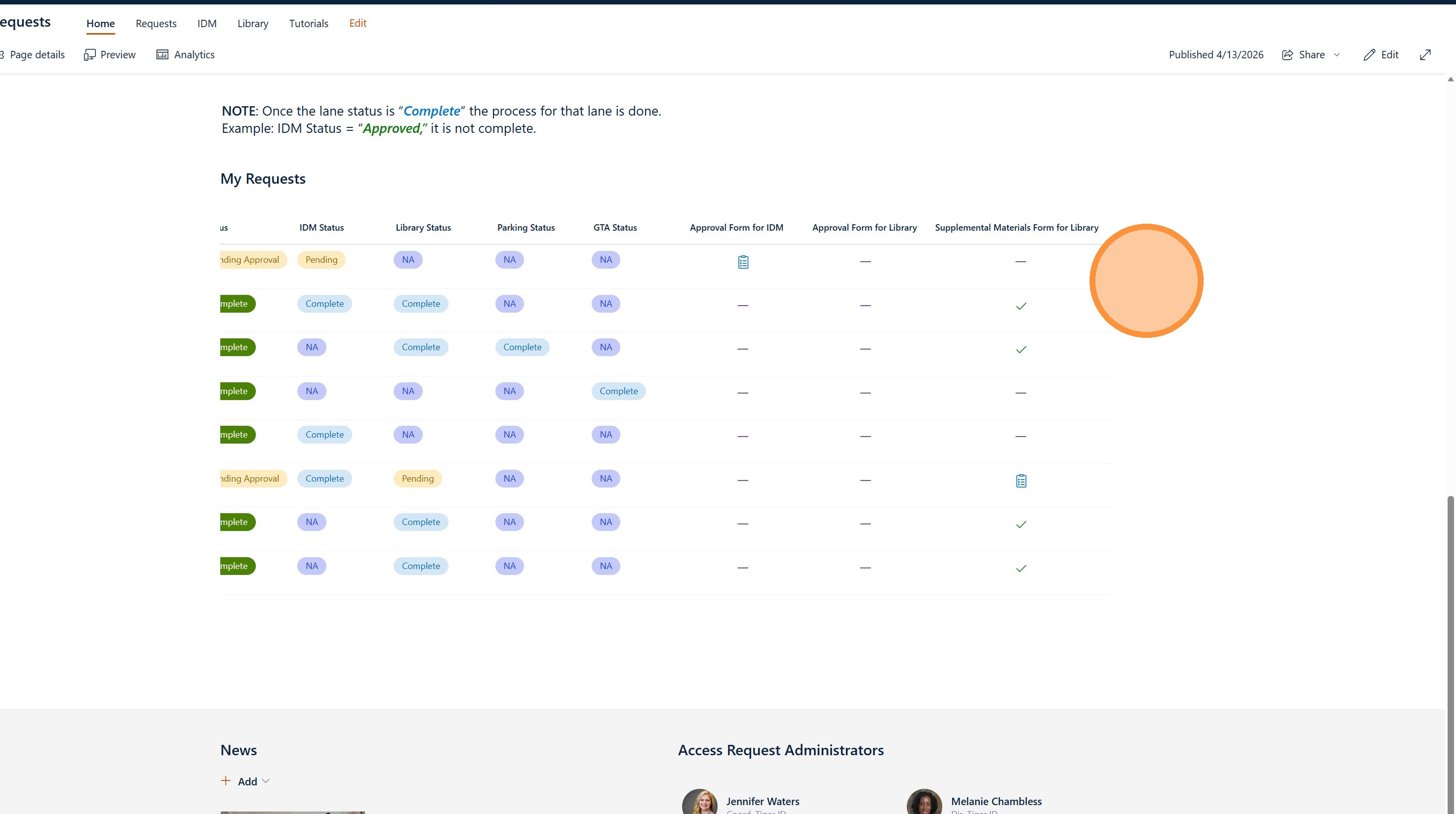
This screenshot shows the section of My Requests that provides you a place to take any pending actions.
- Purple "-" = No actions applicable
- Blue Clip board Icon = Action to take (click to navigate to the form)
- Green Check mark Icon = Action complete
NOTE: Submit any questions or feedback by using this link to the prefilled out form.